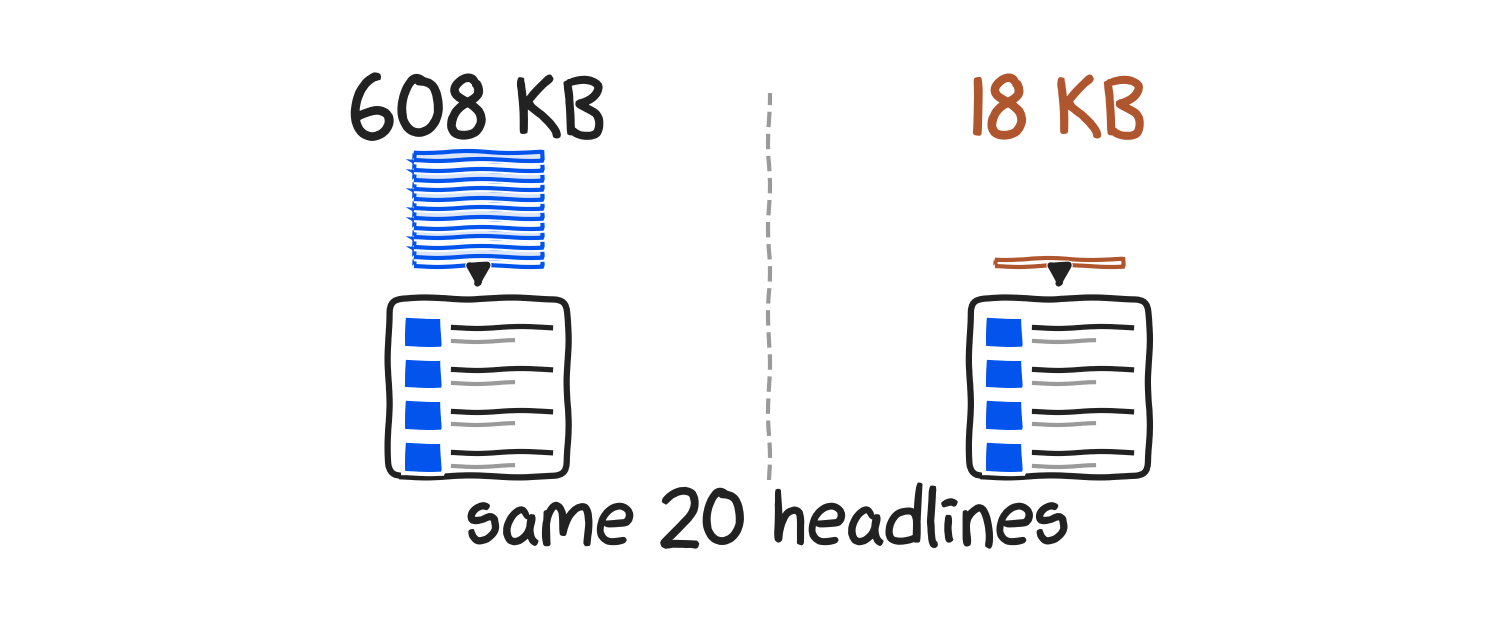
A SwiftUI news app with a home screen widget, 7,504 bytes per refresh
A SwiftUI news app with a WidgetKit widget: full code, and the widget's request measured at 7,504 bytes instead of 257,507.
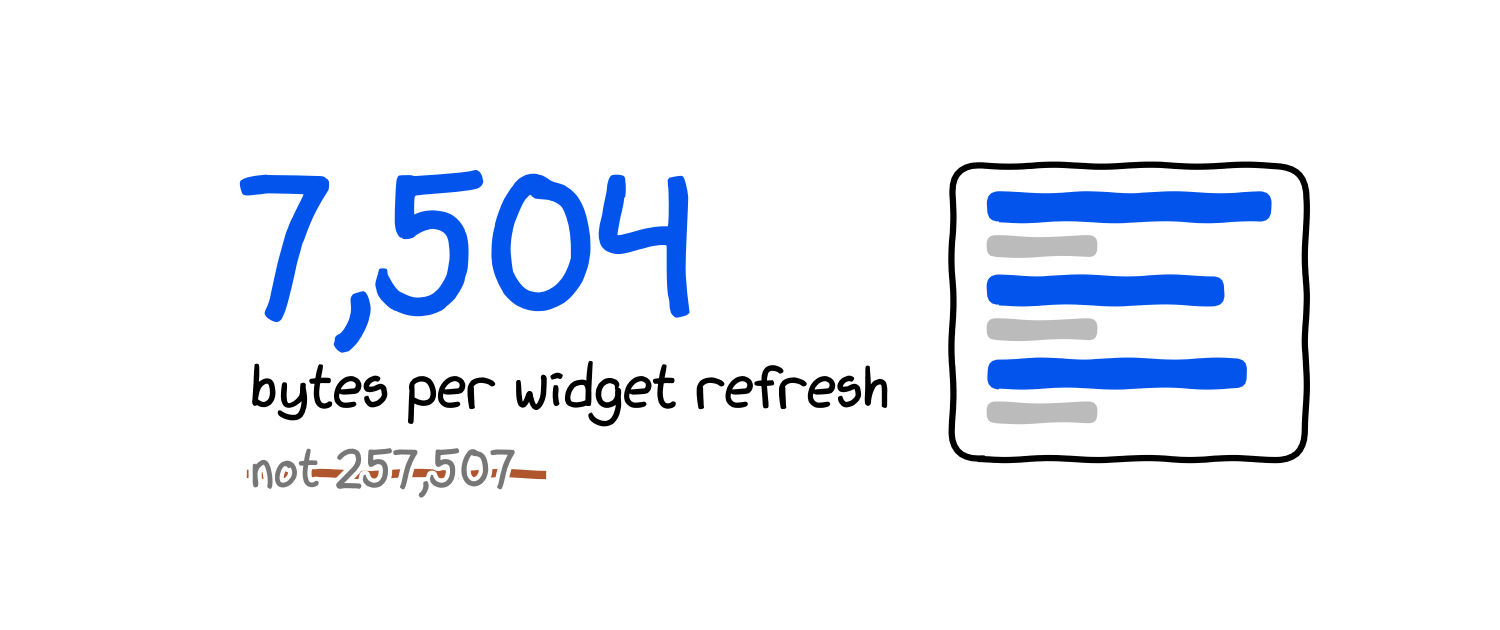
A home screen widget runs on a budget: WidgetKit gives a frequently viewed widget somewhere between 40 and 70 refreshes a day, and each refresh is a process that has to fetch, decode and render before the system loses patience. So before we wrote the SwiftUI part of this SwiftUI news app, we measured the part the widget will repeat 48 times a day. One request for ten top headlines from APITube weighs 257,507 bytes with every field, 7,504 bytes with the six fields the widget needs, and 3,297 bytes if it only asks for titles.
A SwiftUI news app with a home screen widget is two targets sharing one Codable model: an app that lists and opens headlines, and a WidgetKit extension that fetches a few of them on a timeline and draws them on the home screen. Ours has a URLSession client, a list-and-detail screen, and a widget that shows the three newest headlines and falls back to an App Group cache when the network is down. All five files are below, no line longer than 62 characters. The measurements were taken on 16 September 2026 with our own APITube key; APITube is our product.
Takeaways
- Six fields via
fl=cut the widget's download from 257,507 bytes to 7,504 bytes, 34 times smaller, for the same ten headlines. - The default
relevancesort returned headlines with a median age of 548.5 minutes and one 5.6 days old;sort.by=published_atreturned a median age of 66 minutes, maximum 81. - Top US sources published between 165 and 888 headlines an hour over 24 hours, so a 30-minute refresh always has something new.
JSONDecoder's.iso8601strategy fails on APITube'spublished_atbecause the value carries milliseconds; the client uses a formatter with.withFractionalSeconds.- The client fetched ten headlines in 843 to 1,132 ms across five runs from a laptop, cold start included.
This tutorial is for iOS developers with Xcode 15 or newer who want a news app plus widget without a backend. It is not an Xcode click-through; Apple's widget documentation, linked at the end, has the screenshots.
Step 1. Project setup: two targets, one App Group
Create an iOS App project (SwiftUI, iOS 16 or newer), then add a Widget Extension target (File → New → Target). Uncheck "Include Configuration App Intent" so you get a StaticConfiguration. Two settings matter after that:
- App Groups. Add the capability to both targets with the same identifier,
group.io.apitube.newsappin the code below. The widget and the app are separate processes; the group is the only shared storage they have. - Target membership.
NewsClient.swift,HeadlineCache.swiftandSecrets.swiftbelong to both targets. Tick both boxes in the File Inspector, or the widget will not compile.
Keep the API key out of the source. Add a Config.xcconfig with APITUBE_API_KEY = YOUR_API_KEY, set it as the configuration file for both targets, and add an Info.plist row APITUBE_API_KEY with value $(APITUBE_API_KEY) in each target. Secrets.swift reads it at runtime:
import Foundation

enum Secrets {
    // APITUBE_API_KEY: Config.xcconfig -> Info.plist
    static var apiKey: String {
        let key = "APITUBE_API_KEY"
        return Bundle.main.object(forInfoDictionaryKey: key)
            as? String ?? "YOUR_API_KEY"
    }
}
Step 2. The model and the client
Fetching API data in SwiftUI takes one Codable struct and one async function that calls URLSession.data(for:); the view triggers it from .task. The only part that bites is the date. APITube returns published_at as 2026-09-15T22:20:23.000Z, and JSONDecoder.DateDecodingStrategy.iso8601 rejects fractional seconds, so every article fails with dataCorrupted and the message "Expected date string to be ISO8601-formatted." The client below builds an ISO8601DateFormatter with .withFractionalSeconds and uses a custom strategy.
import Foundation

struct Headline: Codable, Identifiable, Hashable {
    let id: Int
    let title: String
    let href: String
    let publishedAt: Date
    let source: Source
    let image: String?

    struct Source: Codable, Hashable {
        let domain: String
    }

    var url: URL? { URL(string: href) }
    var imageURL: URL? { image.flatMap(URL.init(string:)) }
}

struct HeadlinesPage: Codable {
    let status: String
    let results: [Headline]
}

enum NewsError: Error {
    case http(Int)
}

struct NewsClient {
    var apiKey: String
    var session: URLSession = .shared

    static let fields =
        "id,title,href,published_at,source.domain,image"

    static let decoder: JSONDecoder = {
        let iso = ISO8601DateFormatter()
        iso.formatOptions = [.withInternetDateTime,
                             .withFractionalSeconds]
        let d = JSONDecoder()
        d.keyDecodingStrategy = .convertFromSnakeCase
        d.dateDecodingStrategy = .custom { decoder in
            let s = try decoder.singleValueContainer()
                .decode(String.self)
            guard let date = iso.date(from: s) else {
                throw DecodingError.dataCorrupted(.init(
                    codingPath: decoder.codingPath,
                    debugDescription: "bad date \(s)"))
            }
            return date
        }
        return d
    }()

    func topHeadlines(
        country: String = "us", limit: Int = 10
    ) async throws -> [Headline] {
        let base = "https://api.apitube.io"
            + "/v1/news/top-headlines"
        var parts = URLComponents(string: base)!
        parts.queryItems = [
            .init(name: "language.code", value: "en"),
            .init(name: "source.country.code",
                  value: country),
            .init(name: "sort.by", value: "published_at"),
            .init(name: "sort.order", value: "desc"),
            .init(name: "per_page", value: String(limit)),
            .init(name: "fl", value: Self.fields),
        ]
        var request = URLRequest(url: parts.url!)
        request.setValue(apiKey,
                         forHTTPHeaderField: "X-API-Key")
        request.timeoutInterval = 10
        let (data, response) = try await session
            .data(for: request)
        let code = (response as? HTTPURLResponse)?
            .statusCode ?? 0
        guard code == 200 else { throw NewsError.http(code) }
        let page = try Self.decoder
            .decode(HeadlinesPage.self, from: data)
        return page.results
    }
}
Two query parameters do the measurable work: fl= asks for six fields instead of the default 33, and sort.by=published_at asks for the newest headlines instead of the most relevant. Steps 5 and 6 show why.
The cache is a UserDefaults suite in the App Group. It holds the last successful response as JSON so the widget has something to draw when the network call fails:
import Foundation

enum HeadlineCache {
    static let suite = "group.io.apitube.newsapp"
    static let key = "headlines"

    static func save(_ items: [Headline]) {
        let data = try? JSONEncoder().encode(items)
        UserDefaults(suiteName: suite)?.set(data, forKey: key)
    }

    static func load() -> [Headline] {
        guard let data = UserDefaults(suiteName: suite)?
            .data(forKey: key) else { return [] }
        return (try? JSONDecoder()
            .decode([Headline].self, from: data)) ?? []
    }
}
Step 3. List and detail
The app screen is a NavigationStack with a List, a navigationDestination for the detail view, and a .task that loads on appear. .refreshable gives pull-to-refresh for free. On error the view falls back to the cache and only shows a message if the cache is empty too.
import SwiftUI

@main
struct NewsApp: App {
    var body: some Scene {
        WindowGroup {
            HeadlinesView()
        }
    }
}

struct HeadlinesView: View {
    @State private var headlines: [Headline] = []
    @State private var error: String?
    private let client = NewsClient(apiKey: Secrets.apiKey)

    var body: some View {
        NavigationStack {
            List(headlines) { item in
                NavigationLink(value: item) {
                    HeadlineRow(item: item)
                }
            }
            .navigationTitle("Top headlines")
            .navigationDestination(for: Headline.self) {
                HeadlineDetail(item: $0)
            }
            .overlay {
                if let error { Text(error).padding() }
            }
            .task { await load() }
            .refreshable { await load() }
        }
    }

    private func load() async {
        do {
            headlines = try await client
                .topHeadlines(limit: 30)
            HeadlineCache.save(headlines)
            error = nil
        } catch {
            headlines = HeadlineCache.load()
            self.error = headlines.isEmpty
                ? "Could not load: "
                    + error.localizedDescription
                : nil
        }
    }
}

struct HeadlineRow: View {
    let item: Headline

    private var when: String {
        item.publishedAt
            .formatted(.relative(presentation: .named))
    }

    var body: some View {
        VStack(alignment: .leading, spacing: 4) {
            Text(item.title).font(.headline).lineLimit(3)
            Text(item.source.domain + " · " + when)
                .font(.caption).foregroundStyle(.secondary)
        }
    }
}

struct HeadlineDetail: View {
    let item: Headline

    var body: some View {
        ScrollView {
            VStack(alignment: .leading, spacing: 12) {
                if let url = item.imageURL {
                    AsyncImage(url: url) { image in
                        image.resizable().scaledToFit()
                    } placeholder: {
                        Color.secondary.opacity(0.2)
                            .frame(height: 200)
                    }
                }
                Text(item.title).font(.title2.bold())
                Text(item.publishedAt.formatted(
                    date: .abbreviated, time: .shortened))
                    .foregroundStyle(.secondary)
                if let url = item.url {
                    Link("Read on \(item.source.domain)",
                         destination: url)
                }
            }
            .padding()
        }
        .navigationTitle(item.source.domain)
    }
}
The detail view links out to the publisher instead of rehosting the article body, and body is also the field that makes the full response 34 times larger.
Step 4. The widget
A WidgetKit widget can make network requests: getTimeline(in:completion:) runs in the extension process, and a Task inside it can await a URLSession call before handing WidgetKit the timeline. The provider below fetches ten headlines, shows the first three, saves all ten to the cache so the app opens with a full list, and asks for the next refresh 30 minutes later. If the fetch fails it draws the cached headlines and labels them.
import WidgetKit
import SwiftUI

struct HeadlinesEntry: TimelineEntry {
    let date: Date
    let headlines: [Headline]
    let fromCache: Bool
}

struct HeadlinesProvider: TimelineProvider {
    func placeholder(in context: Context) -> HeadlinesEntry {
        HeadlinesEntry(date: .now,
                       headlines: HeadlineCache.load(),
                       fromCache: true)
    }

    func getSnapshot(
        in context: Context,
        completion: @escaping (HeadlinesEntry) -> Void
    ) {
        completion(placeholder(in: context))
    }

    func getTimeline(
        in context: Context,
        completion: @escaping (Timeline<Entry>) -> Void
    ) {
        Task {
            let client = NewsClient(apiKey: Secrets.apiKey)
            var items = HeadlineCache.load()
            var fromCache = true
            if let fresh = try? await client
                .topHeadlines(limit: 10) {
                items = fresh
                fromCache = false
                HeadlineCache.save(fresh)
            }
            let entry = HeadlinesEntry(date: .now,
                                       headlines: items,
                                       fromCache: fromCache)
            let next = Calendar.current.date(
                byAdding: .minute, value: 30, to: .now)!
            completion(Timeline(entries: [entry],
                                policy: .after(next)))
        }
    }
}

struct HeadlinesWidgetView: View {
    let entry: HeadlinesEntry

    var body: some View {
        VStack(alignment: .leading, spacing: 6) {
            ForEach(entry.headlines.prefix(3)) { item in
                VStack(alignment: .leading, spacing: 1) {
                    Text(item.title)
                        .font(.caption.bold()).lineLimit(2)
                    Text(item.source.domain)
                        .font(.caption2)
                        .foregroundStyle(.secondary)
                }
            }
            Spacer(minLength: 0)
            Text(entry.fromCache ? "cached" : entry.date
                .formatted(date: .omitted, time: .shortened))
                .font(.caption2).foregroundStyle(.tertiary)
        }
        .widgetURL(entry.headlines.first?.url)
    }
}

@main
struct HeadlinesWidget: Widget {
    var body: some WidgetConfiguration {
        StaticConfiguration(
            kind: "TopHeadlines",
            provider: HeadlinesProvider()
        ) { entry in
            HeadlinesWidgetView(entry: entry).padding()
        }
        .configurationDisplayName("Top headlines")
        .description("Three newest US headlines.")
        .supportedFamilies([.systemMedium, .systemLarge])
    }
}
widgetURL makes the whole widget a tap target that opens the app with the first headline's URL; handle it with .onOpenURL to jump to that article. @main on the widget struct is right for a single-widget extension; several widgets need a WidgetBundle.
Step 5. What the widget downloads
The widget's request is 7,504 bytes because of fl=; the same ten headlines without it are 257,507 bytes. We sent each variant five times from a laptop on 16 September 2026 and recorded the body size and wall time.
| Request (10 headlines) | Body size | Wall time, 5 runs |
|---|---|---|
| all fields | 257,507 bytes | 370–3,274 ms |
fl=id,title,href,published_at,source.domain,image |
7,504 bytes | 363–2,635 ms |
fl=title |
3,297 bytes | 372–2,614 ms |
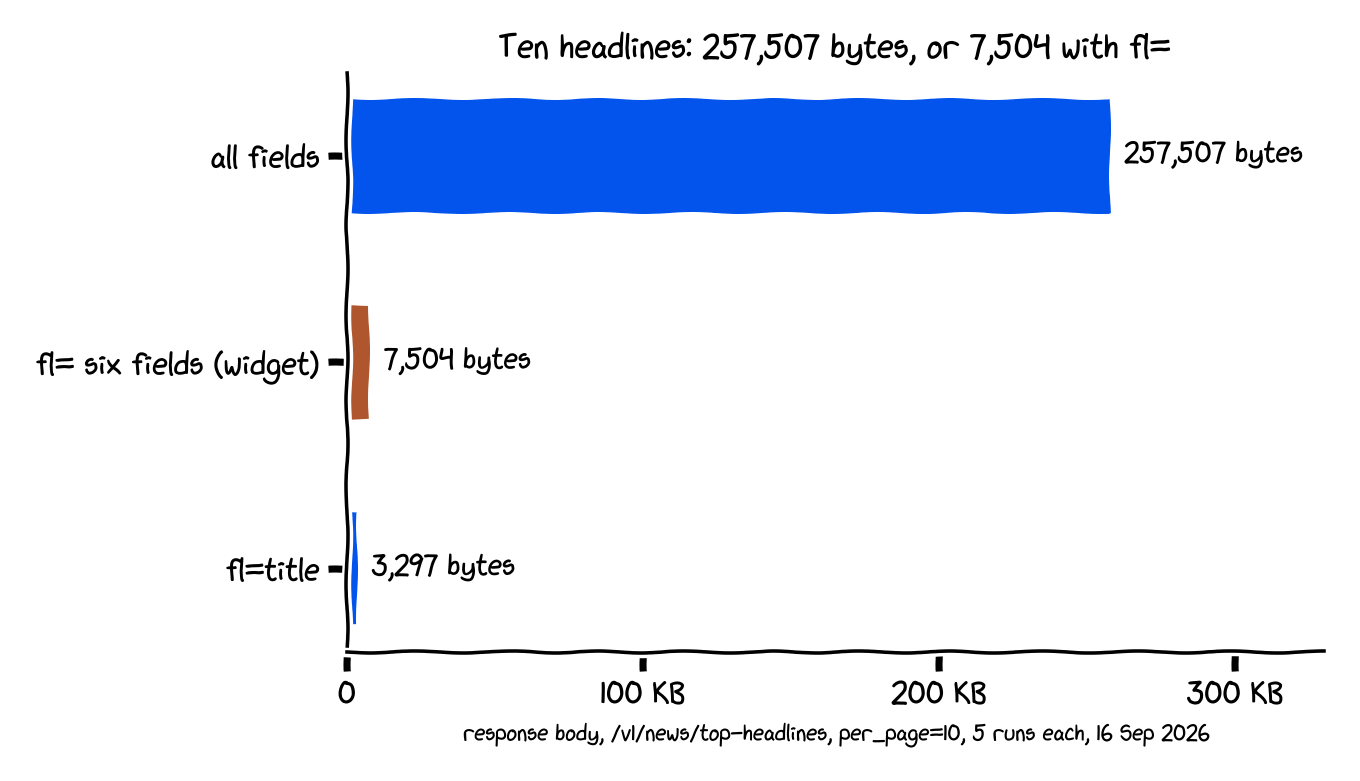
Sizes were identical across the five runs. Wall time was not: the first call of each variant took 2.6 to 3.3 seconds and, with one 2.1-second exception, the rest took 0.4 to 0.9 seconds, so the spread is connection setup, not payload. The 34-fold difference in bytes is what matters on a cellular connection or in an extension with seconds to live, and it comes from one query parameter.
Step 6. Which sort gives fresh headlines
For a widget, sort.by=published_at is the right sort on APITube's /v1/news/top-headlines, because the default relevance order returned a median headline age of 548.5 minutes and one item 5.6 days old. We fetched 50 headlines each way for language.code=en and source.country.code=us and computed the age of each from its published_at.
| Sort | Results | Median age | Youngest | Oldest |
|---|---|---|---|---|
relevance (default) |
50 | 548.5 min | 35 min | 7,999 min |
published_at desc |
49 | 66 min | 7 min | 81 min |
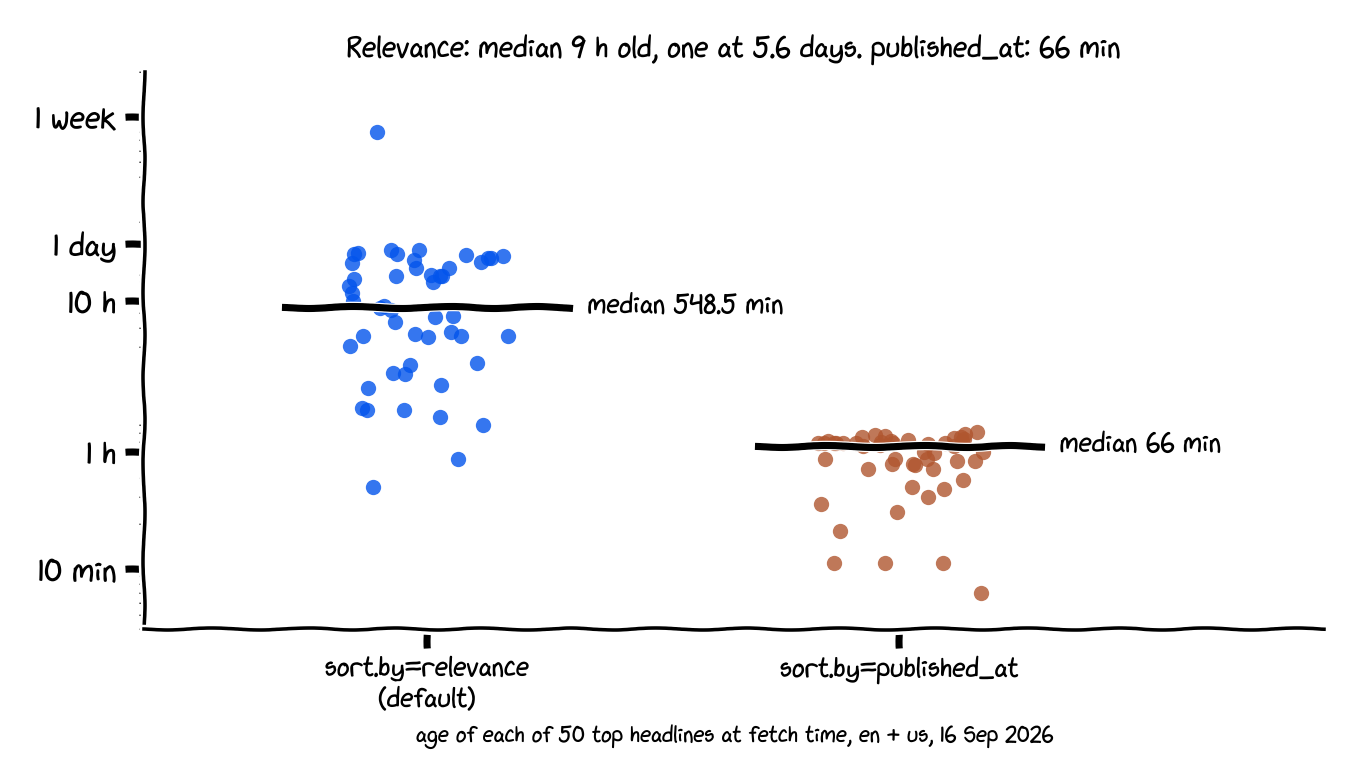
Both sorts draw from the same pool: every result in the published_at set came from a source with an OPR rank between 5 and 7 and a US location, which is what "top" means on this endpoint. Relevance suits a search box. On a home screen, a headline from last Wednesday is a bug.
Step 7. How often to refresh
A WidgetKit widget refreshes when its timeline says so, within a system budget of roughly 40 to 70 refreshes a day for a widget the user looks at often, which works out to one refresh every 15 to 60 minutes. Apple also asks for timeline entries at least 5 minutes apart. The provider above uses .after(30 minutes), which is 48 refreshes a day at most and leaves headroom for the app's own reloads.
Whether 30 minutes is enough depends on how fast new headlines arrive, so we counted. One /v1/news/count call per hour for the last 24 hours, filtered to English, US sources with OPR rank 5 or higher:
| Hour (UTC) | New headlines |
|---|---|
| Quietest, 06:00 | 165 |
| Median hour | 514 |
| Busiest, 17:00 | 888 |
| 24-hour total | 12,827 |
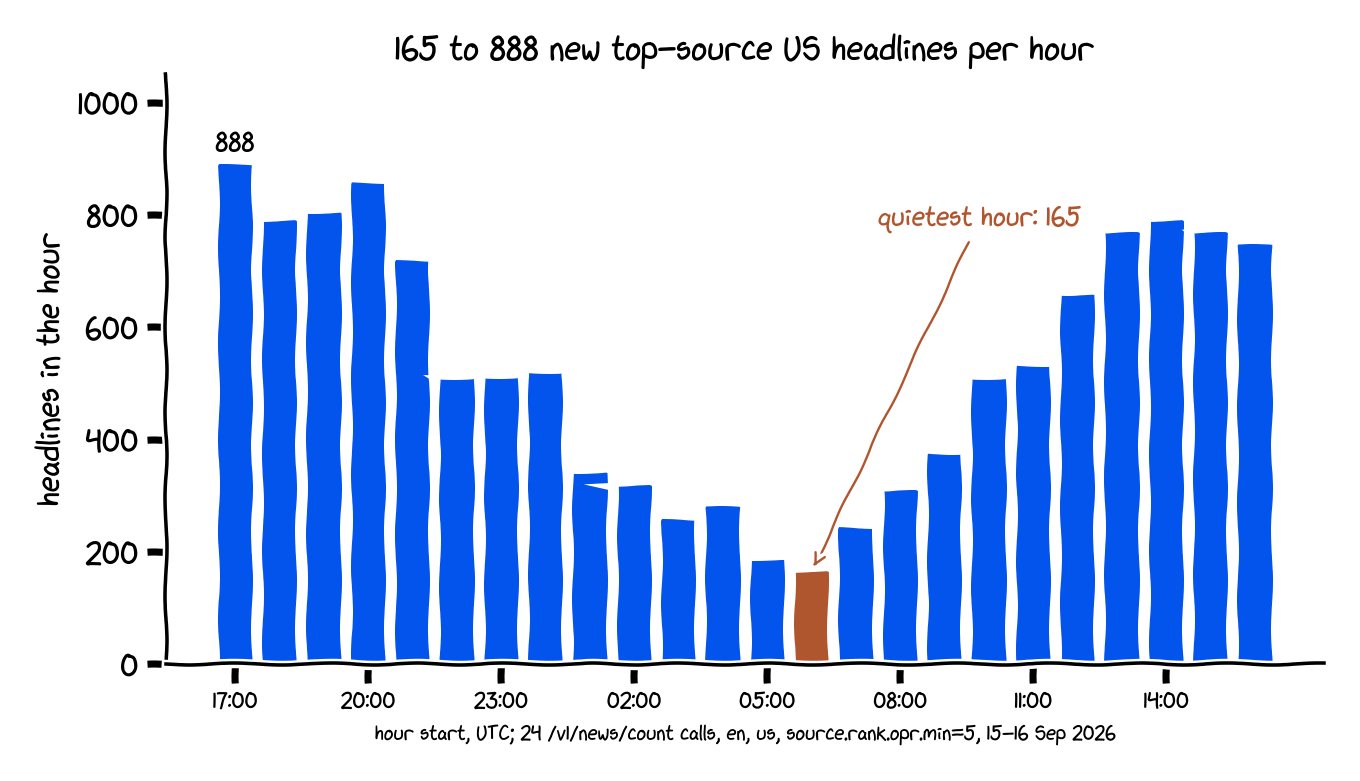
Even the quietest hour delivers 41 new headlines per 15 minutes, so a widget that shows three will never repeat itself between refreshes. Unlike a countdown or weather widget, where the data changes on a schedule you can predict, a news widget has more new data than refreshes, which means the reload policy should be set by the budget, not by the feed.
What we ran, and what we did not
The client, the model and the cache were compiled with swiftc 5.8 on macOS 13.4 and run five times against the live API from a command-line harness: ten headlines in 843, 941, 1,047, 1,066 and 1,132 ms, ages between 9 and 39 minutes, and a cache round-trip of ten items through a UserDefaults suite. The SwiftUI views and the WidgetKit provider were type-checked against the macOS 13 SDK with the same compiler. The measurement machine has no Xcode, so the app was not launched in an iOS simulator or on a device, and there are no screenshots. If a line fails to build on iOS, check the App Group entitlement and target membership from step 1 first.
One plan detail affects the widget directly: APITube's free tier delays articles by 12 hours and returns 10 results per request. The 100 requests a day it allows cover a 30-minute widget (48) plus app opens, but the headlines will be twelve hours old. The numbers in this article come from a paid key with no delay.
Frequently asked questions
How do I fetch API data in SwiftUI?
Fetching API data in SwiftUI is one async throws function that calls URLSession.shared.data(for:), checks the status code, and decodes with JSONDecoder, called from a view's .task modifier so it runs when the view appears and is cancelled when it disappears. The NewsClient in step 2 is that function with the date strategy APITube needs.
How often does a WidgetKit widget refresh?
A WidgetKit widget refreshes as often as its TimelineReloadPolicy asks and the system budget allows, which is about 40 to 70 refreshes a day for a widget the user views often, or one every 15 to 60 minutes. A .after(30 minutes) policy fits inside that budget with room for WidgetCenter.shared.reloadTimelines calls from the app.
How do I share data between an app and its widget?
Data is shared between an app and its widget through an App Group, because the two run as separate processes with separate sandboxes. Add the same App Group capability to both targets, then use UserDefaults(suiteName:) or a container URL from FileManager for that group; HeadlineCache in step 2 stores the last headlines as JSON in such a suite.
Can a widget make network requests?
A widget can make network requests from its timeline provider, because getTimeline runs in the extension and accepts an asynchronous completion; wrap the await in a Task and call completion when the data arrives. Keep the request small and fall back to cached data on failure, since the extension has seconds, not minutes, before the system moves on.
Where to take it
The five files are a complete SwiftUI news app with a widget, and the three measurements tell you what to change if you fork it: the field list if the widget gets images, the sort if you switch to a category feed, the refresh policy if the budget throttles you. APITube is the API in this tutorial; the free tier at apitube.io covers the widget's 48 daily refreshes, with the 12-hour delay noted above.
Resources
- Swift Senpai, "How to Update or Refresh a Widget?", refresh budget and reload policies: https://swiftsenpai.com/development/refreshing-widget/
- Use Your Loaf, "WidgetKit for iOS – Getting Started": https://useyourloaf.com/blog/widgetkit-for-ios-getting-started/
- Hacking with Swift, "How to download JSON from the internet and decode it into any Codable type": https://www.hackingwithswift.com/quick-start/concurrency/how-to-download-json-from-the-internet-and-decode-it-into-any-codable-type
- Apple Developer Documentation, "Keeping a widget up to date": https://developer.apple.com/documentation/widgetkit/keeping-a-widget-up-to-date
- APITube documentation, top headlines and
fl=: https://docs.apitube.io - Data for this article:
th_payload.csv,th_ages.csv,hourly_top_source_headlines.csvinimages/6-swiftui-news-app-home-screen-widget/