Headlines in Home Assistant with a REST sensor, and how often to poll
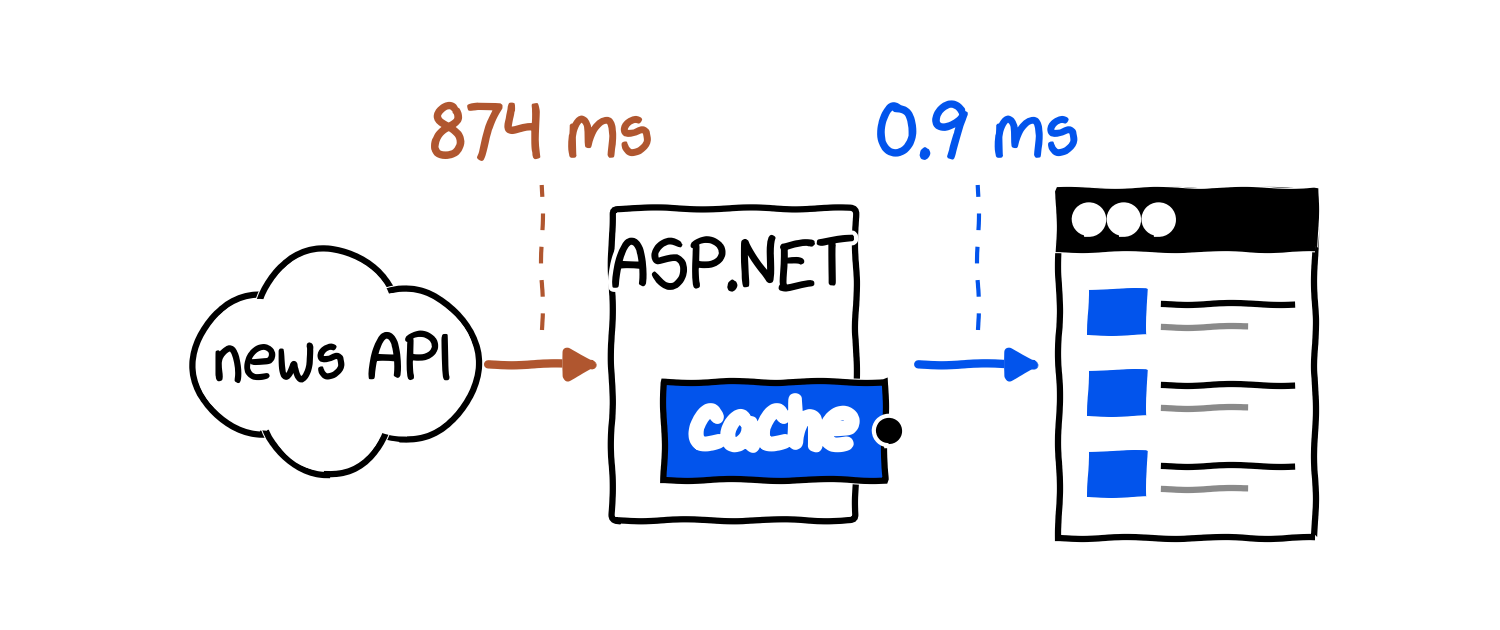
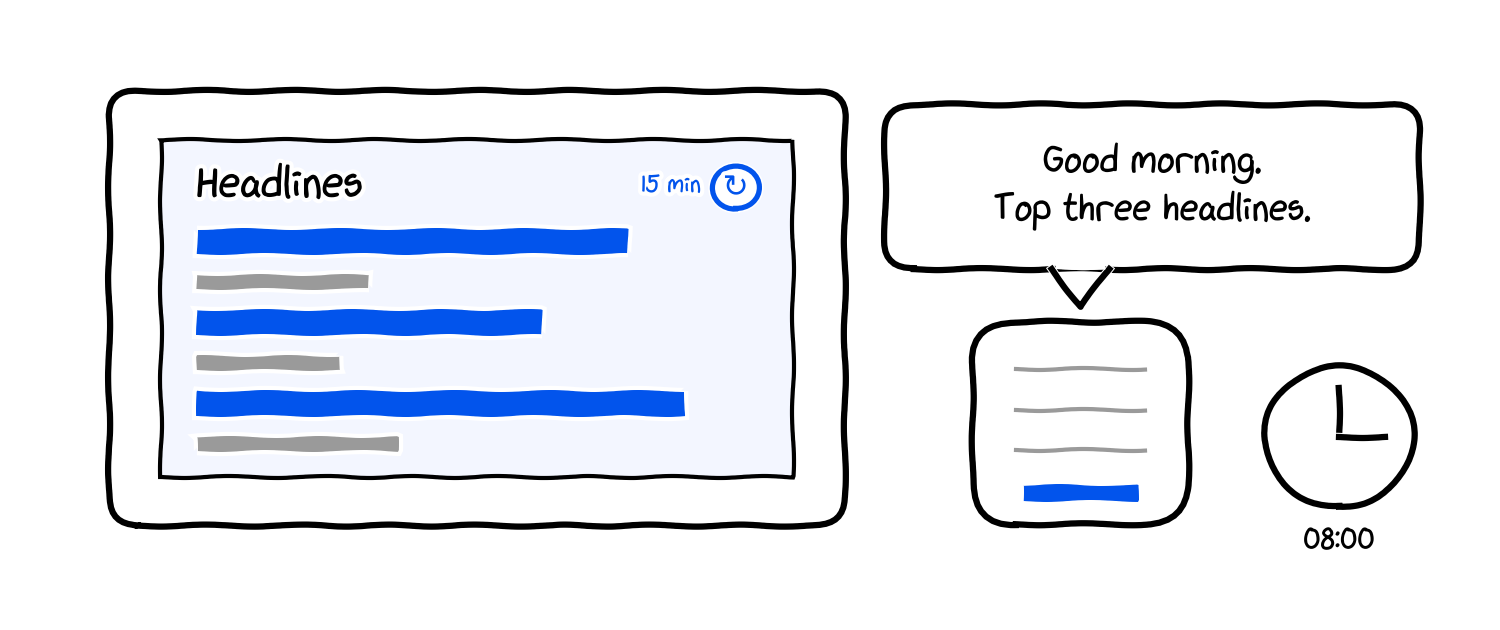
Home Assistant news feed: one rest: sensor, a markdown card, an 8 am TTS.
Home Assistant's REST sensor polls every 30 seconds by default. Point it at a news API and that is 2,880 requests a day for a card nobody looks at more than a few times an hour. A free news API key gives us 100 requests a day, so the default burns the day's budget in 50 minutes. This article sets up a news feed in Home Assistant: a rest: sensor that fetches a JSON news endpoint on a schedule, keeps the headlines in an entity attribute, and feeds one markdown card and one automation that reads the headlines out loud at 8 am. Then it measures how often the top headlines really change, so scan_interval is a number we can defend.
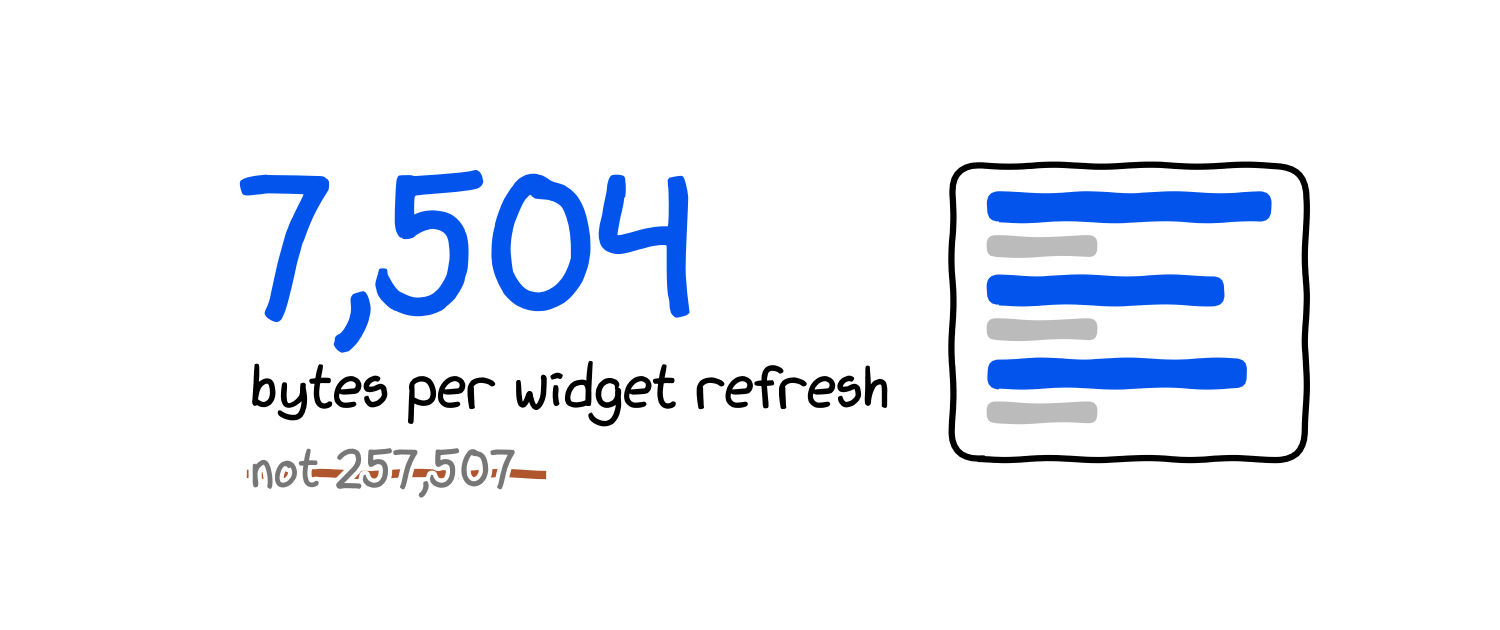
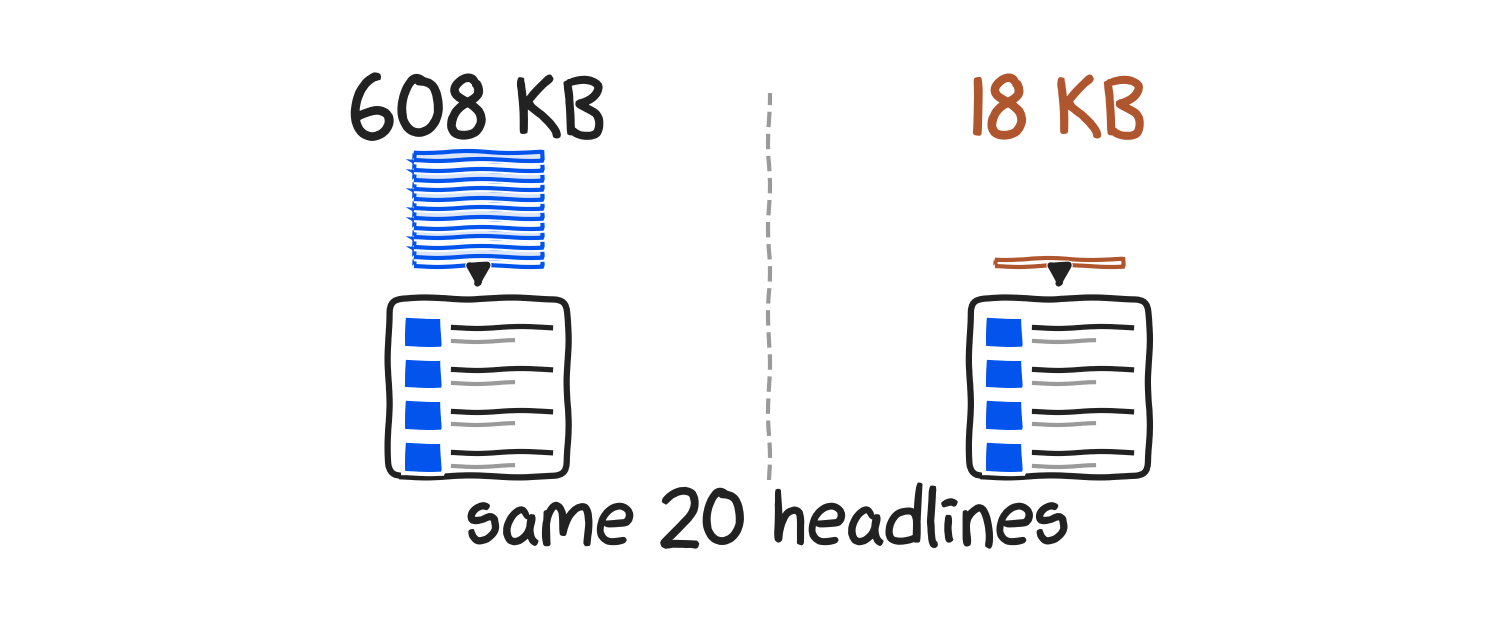
We polled the same "latest 10 English headlines" query once a minute for 150 minutes on 17 September 2026. On average 1.79 new headlines entered the top 10 per minute, 34% of one-minute polls came back identical to the minute before, and at a 15-minute interval every poll returned a card with nothing repeated from the previous one. Field selection cut the response for five headlines from 179,154 bytes to 3,655 bytes, which matters because Home Assistant writes those attributes to its database on every change.
This is for people who already run Home Assistant and can edit configuration.yaml. No HACS, no shell scripts, no restart: the REST integration reloads from Developer tools.
Takeaways
- Default
scan_interval: 30= 2,880 requests/day; free tier = 100/day, so the key is exhausted after 50 minutes. - 1.79 new headlines per minute on average (median 1); 50 of 147 consecutive one-minute polls (34%) returned the same top 10 as the minute before.
- At
scan_interval: 900(15 min) 0% of the card repeats between polls, and the card shows 100 of the 273 headlines that passed through in 2.5 hours. fl=id,title,href,source.domain,published_atshrinks the 5-headline response 49×: 179,154 → 3,655 bytes.language=enis silently ignored by the API;language.code=enis the filter that works.
Why a JSON API and not the RSS feed
The two most-linked community threads for this task both scrape RSS: one picks BBC XML apart with Jinja regex_findall inside a REST sensor, the other runs curl plus a Python script behind a command_line sensor and needs a full restart on every change. Both work until a publisher changes its XML.
Unlike an RSS feed, a JSON news API returns a results array that json_attributes can store as-is, which means the whole "parser" is one line of YAML. It also lets us filter by language, country, category and source quality in the query instead of in a template. We use APITube below because it is ours; disclosure done. Any JSON news API with a header key and a results list works the same way, only the parameter names change.
Step 1: the request, checked with curl
Get the query right in a terminal before it goes into YAML. fl is the field list, and it is the parameter that keeps the sensor small.
curl -s -G "https://api.apitube.io/v1/news/everything" \
  -H "X-API-Key: $APITUBE_API_KEY" \
  --data-urlencode "per_page=5" \
  --data-urlencode "language.code=en" \
  --data-urlencode "source.rank.opr.min=6" \
  --data-urlencode "sort.by=published_at" \
  --data-urlencode "sort.order=desc" \
  --data-urlencode \
    "fl=id,title,href,source.domain,published_at"
The response is 3.7 KB. Two of the five results:
{
  "status": "ok",
  "limit": 5,
  "page": 1,
  "results": [
    {
      "id": 3083478940,
      "title": "Infineon sells FRAM and NOR Flash...",
      "href": "https://www.electronicsweekly.com/news/...",
      "source": { "domain": "electronicsweekly.com" },
      "published_at": "2026-09-17T07:11:36.000Z"
    },
    {
      "id": 3083478888,
      "title": "VdL to outline under-age internet and AI...",
      "href": "https://www.electronicsweekly.com/news/...",
      "source": { "domain": "electronicsweekly.com" },
      "published_at": "2026-09-17T07:11:36.000Z"
    }
  ]
}
Three parameters deserve a sentence each:
source.rank.opr.min=6drops low-ranked domains. Without it the "latest" list is whatever small site published a second ago. Swap it forsource.country.code=gborcategory.id=medtop:04000000(economy) if the card should be narrower.language.code=en. We first wrotelanguage=en, got astatus: okand a list with Czech and Slovak headlines in it. The API does not reject unknown parameters; it ignores them.fl=. Without it the same five headlines come back as 179,154 bytes, because every result carries the body, entities, sentiment and media. With it: 3,655 bytes, 49× less.
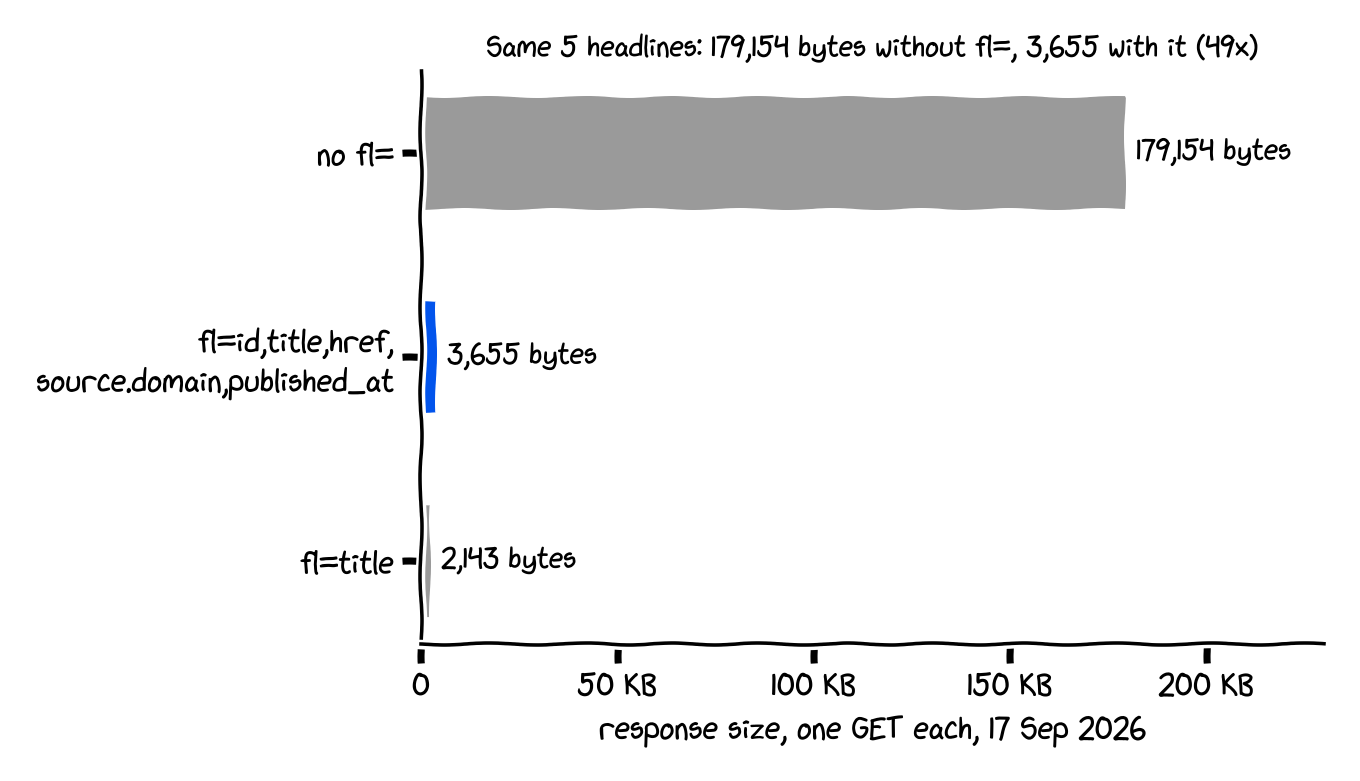
That size is not a bandwidth concern. It is a recorder concern: Home Assistant stores an entity's attributes in its SQLite or MariaDB database every time they change, so a 179 KB attribute blob that changes on most of its 96 daily polls is up to 17 MB of database growth per day for a headlines card.
Step 2: the REST sensor
Put the key in secrets.yaml and add this to configuration.yaml:
# secrets.yaml
apitube_api_key: YOUR_API_KEY
# configuration.yaml
rest:
  - resource: https://api.apitube.io/v1/news/everything
    # 15 minutes, see the measurement below
    scan_interval: 900
    timeout: 20
    headers:
      X-API-Key: !secret apitube_api_key
    params:
      per_page: 5
      language.code: en
      source.rank.opr.min: 6
      sort.by: published_at
      sort.order: desc
      fl: id,title,href,source.domain,published_at
    sensor:
      - name: News headlines
        unique_id: news_headlines
        value_template: "{{ value_json.results | count }}"
        json_attributes:
          - results
The sensor's state is the number of headlines (5). The headlines themselves live in the results attribute as a list of five dicts. That split is deliberate: Home Assistant refuses any state longer than 255 characters (MAX_LENGTH_STATE_STATE = 255 in homeassistant/const.py), and if a template produces more it logs "State … is longer than 255, falling back to unknown" and sets the state to unknown. Attributes have no such limit, so lists go there.
timeout: 20 is not decoration. In our 150 polls the median response took 739 ms and the 90th percentile 1,018 ms, but the slowest took 13.9 s; with the default timeout: 10 the sensor would have gone unavailable for that minute.
json_attributes without json_attributes_path reads keys from the root object, so results becomes state_attr('sensor.news_headlines', 'results'). No JSONPath, no regex_findall.
Reload without a restart: Developer tools → YAML → REST entities and notify services. Then Developer tools → States → sensor.news_headlines should show state 5 and a results attribute.
Step 3: the markdown card
Add a markdown card to the dashboard. The template loops over the attribute:
type: markdown
title: Headlines
content: |
  {% for a in state_attr('sensor.news_headlines',
                         'results') %}
  **[{{ a.title }}]({{ a.href }})**<br>
  <small>{{ a.source.domain }} ·
  {{ relative_time(as_datetime(a.published_at)) }}
  ago</small>

  {% endfor %}
relative_time() turns the ISO timestamp into "12 minutes", and Home Assistant re-renders templates that use it once a minute, so the "ago" stays right between polls. The blank line before {% endfor %} is what separates the items; without it they run together in one paragraph. The <small> tag is fine; the markdown card allows HTML, just not JavaScript.
Title length is the one thing worth guarding. Across the 273 distinct headlines in our log the longest title was 133 characters and the median 74, so even a title-as-state sensor would have stayed under 255. One long title from a small site would still flip it to unknown, which is why the count is the state.
Step 4: read the headlines at 8 am
One automation with a time trigger and tts.speak. Pick your TTS entity (tts.google_translate_en_com, tts.piper, whatever the TTS integration created) and a media player.
automation:
  - alias: Morning headlines
    triggers:
      - trigger: time
        at: "08:00:00"
    actions:
      - action: tts.speak
        target:
          entity_id: tts.google_translate_en_com
        data:
          media_player_entity_id: media_player.kitchen
          message: >-
            Good morning. The top three headlines.
            {% for a in state_attr(
                'sensor.news_headlines',
                'results')[:3] %}
            {{ loop.index }}. {{ a.title }}.
            {% endfor %}
Three headlines, not five: at the median title length of 74 characters in our log, five titles is 370 characters read aloud, and nobody stands still for that. If the sensor is unavailable at 08:00 (two of our 150 polls got an HTTP 500), state_attr returns None and the template errors, so add a condition {{ state_attr('sensor.news_headlines', 'results') is not none }} before the action if the automation should fail quietly.
For a Voice Preview or any Assist satellite, replace tts.speak with assist_satellite.announce and the same message template.
Step 5: how often to poll, measured
This is the part the forum threads skip. One picked 20 minutes; the docs default is 30 seconds; neither number came from data. So we polled the exact query from Step 1 (ten results instead of five, to see more movement) once a minute for 150 minutes and logged the ten ids each time. The log is in data.csv next to this article.
The run: 150 polls between 07:12 and 09:41 UTC. 148 returned status: ok; two came back HTTP 500 one minute apart, which is what a rest sensor sees as a minute of unavailable. Across the 148 good polls 273 distinct headlines passed through the top 10: 1.79 new per minute on average, median 1, and 50 of 147 consecutive polls (34%) returned exactly the same ten. The newest headline on the card had been published a median of 5.1 minutes before we fetched it, so polling faster than every five minutes cannot make the card fresher than that. One caveat: this is one query on one Thursday morning (UTC). A single-category feed or a Sunday will turn over slower, so replay data.csv against your own query before trusting 15 minutes.
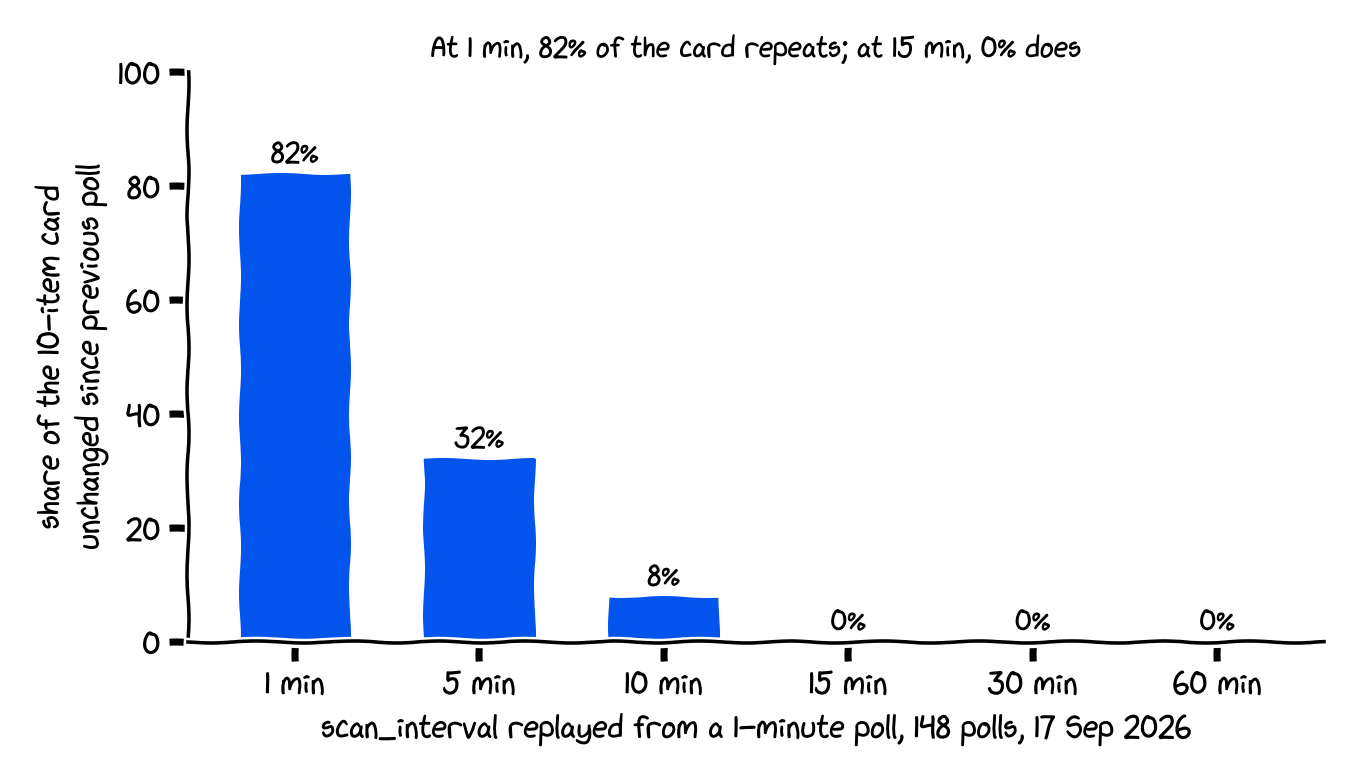
Replaying a slower scan_interval means taking every k-th poll and asking two things: what share of the card is identical to the previous poll (a wasted request), and how many of the 273 headlines the card would have shown at all.
scan_interval |
Requests/day | Free tier (100/day) | Pay-as-you-go, $0.01/req | Card unchanged since previous poll | Headlines shown in 2.5 h (of 273) |
|---|---|---|---|---|---|
| 30 s (default) | 2,880 | exhausted in 50 min | $864/mo | not replayable from a 1-min log; above 82% | — |
| 1 min | 1,440 | exhausted in 100 min | $432/mo | 82% | 273 |
| 5 min | 288 | no | $86.40/mo | 32% | 207 |
| 10 min | 144 | no | $43.20/mo | 8% | 139 |
| 15 min | 96 | yes | $28.80/mo | 0% | 100 |
| 30 min | 48 | yes | $14.40/mo | 0% | 50 |
| 60 min | 24 | yes | $7.20/mo | 0% | 30 |
Requests per day are arithmetic (86,400 ÷ interval); the last two columns are replayed from data.csv. Plan limits and the $0.01 pay-as-you-go price are from the APITube pricing page on 17 September 2026; the free tier is 100 requests a day and 3,000 a month, at 10 requests a minute.
Below 15 minutes, requests go to re-fetching headlines the card already has: at 1 minute, 82 of every 100 rows are repeats. At 15 minutes and above nothing repeats, but the card samples a thinner slice of the day. The interval is not about freshness, because the API's own lag is about five minutes either way; it is a trade between request budget and how much of the news the card gets to show.
The rule we would give a friend:
- 15 minutes if the key is free: 96 requests a day fits under 100 with room for a manual reload, and in our run nothing on the card was a repeat.
- 60 minutes if the card is on a wall tablet nobody taps: 24 requests a day, the card still turned over completely between polls, it just showed 30 of the 273 headlines instead of 100.
- Never the default. 30 seconds is right for a temperature sensor and wrong for anything with a per-request price.
That is the whole build: one rest: block, one card, one automation, and a scan_interval with a reason behind it.
FAQ
How do I show news headlines on a Home Assistant dashboard?
The simplest way to show news headlines on a Home Assistant dashboard is a rest: sensor with json_attributes: [results] pointed at a JSON news endpoint, rendered by a markdown card that loops over state_attr('sensor.news_headlines', 'results'). No custom card and no HACS component is required.
What is the difference between feedreader and a REST sensor in Home Assistant?
The difference between feedreader and a REST sensor in Home Assistant is that feedreader polls hourly and exposes only the latest entry as an event entity, while a REST sensor polls on any scan_interval and stores the whole list of headlines as one attribute, which means a REST sensor can drive a multi-headline card on its own and feedreader cannot. Stacking feedreader events into an input_text runs into the same 255-character ceiling as a state.
How often does a Home Assistant REST sensor update?
A Home Assistant REST sensor updates every 30 seconds by default (scan_interval: 30). For a news feed, 15 minutes (scan_interval: 900) is the shortest interval at which nothing on a 10-item card repeated between polls in our 150-poll measurement, and it uses 96 of a free key's 100 daily requests.
Why is my Home Assistant sensor state unknown after a template change?
A Home Assistant sensor state becomes unknown when a template renders more than 255 characters, because MAX_LENGTH_STATE_STATE in core is 255. Keep the state short (a count or a timestamp) and put headlines in attributes, which have no length limit.
How do I make Home Assistant read the news out loud?
To make Home Assistant read the news out loud, use an automation with a time trigger and a tts.speak action whose message is a Jinja template over the sensor's results attribute. Three headlines makes a short announcement; five, at a median 74 characters each, drags.
Resources
- Home Assistant RESTful integration:
rest:schema,scan_intervaldefault,json_attributes. - Home Assistant markdown card: templates and allowed HTML.
- Home Assistant TTS:
tts.speakfields. MAX_LENGTH_STATE_STATEin homeassistant/const.py: the 255-character limit.- APITube docs:
/v1/news/everything,fl,language.code,source.rank.opr.min. - APITube is one of the APIs we used here; the free tier at apitube.io is enough for the 15-minute sensor.